
WordPress and WooCommerce
Process customized orders and production files
Read the design attached to an order, verify its status, and generate the right production artifact without using the cart preview as source artwork.
Guide overview
Before you start
- A test order contains a customized line.
- Production dimensions are configured on every view.
- The active plan allows the requested export type.
Expected result
The order exposes a traceable design reference, readable choices, preview, status, and correctly scaled production output.
Inspect the order line
WooCommerce order items keep a human-readable summary and a secure design reference. The administrative order view should show the preview, selected options, calculated customization amount, and production status without exposing raw private state unnecessarily.
A cart thumbnail is a visual aid, not the print-ready source.
Open the completed test order.
Locate the customized line.
Compare its summary with the storefront choices.
Confirm the design reference resolves.
Generate the production artifact
Use the configured physical dimensions, resolution, drawing-area clipping, and printing method to create the production file. Depending on product and plan, this may be a high-resolution raster, vector-compatible asset, or portable state for an external workflow.
Generate from canonical saved state so hidden previews and compressed cart images cannot affect output quality.
Choose the required view or area.
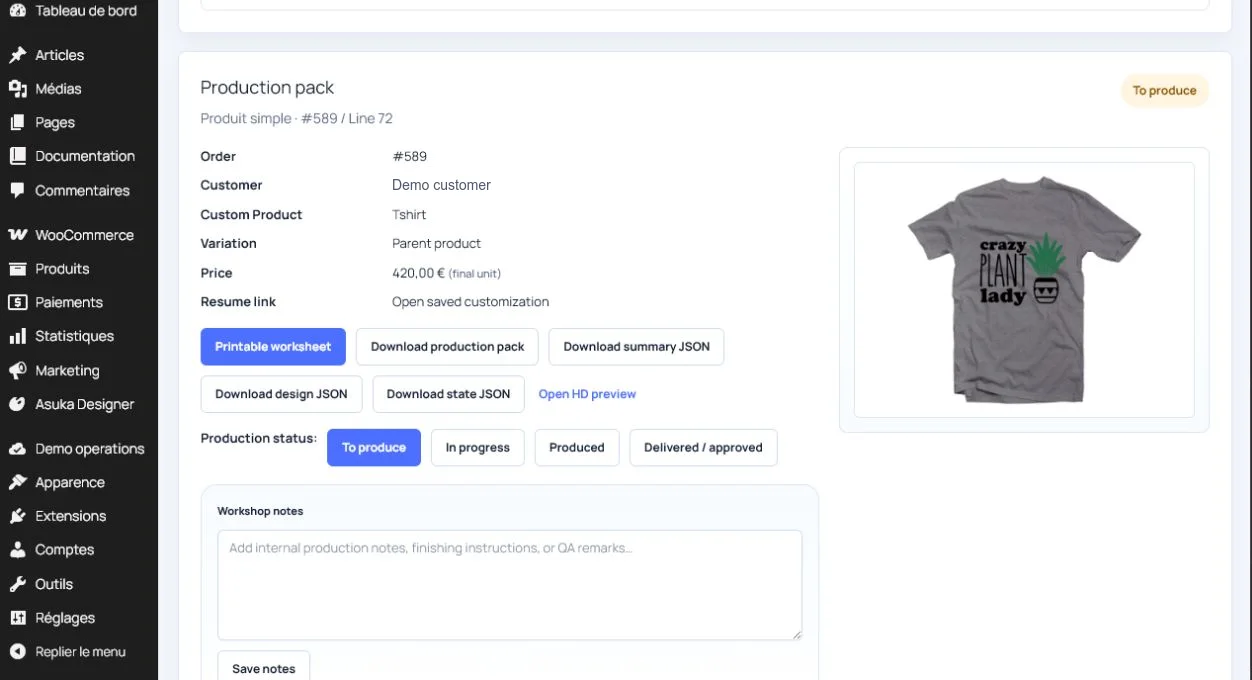
Start the production export.
Wait for a completed status.
Download and inspect dimensions and transparency.
Handle retries and retention
A failed export should preserve the order and design reference, record a useful error, and allow a controlled retry. Define how long customer uploads and production files are retained according to store policy.
When sharing with a producer, use expiring authorized links rather than publicizing private source files.
Simulate or inspect one failure.
Retry without duplicating the order record.
Verify access control on downloads.
Document the retention policy.